
Strata and property managers in Australia know maintaining apartments and residential buildings can be challenging, especially when maintenance requests come from scattered sources like emails, phone calls, or informal chats. This often leads to incomplete info, delayed decisions, unclear responsibility, poor visibility, and repeated resident follow-ups, which causes frustration for everyone.
Creating a clear maintenance request workflow supported by reliable properties and apartment maintenance software can transform how maintenance is handled. A maintenance request workflow is a step-by-step process for receiving, assessing, approving, assigning, tracking, and closing maintenance jobs across apartment and residential properties.
This guide will walk you through how to create a streamlined, effective maintenance request workflow tailored for strata buildings, apartment complexes, and residential properties. With these practical steps and tips, you’ll improve communication, reduce admin headaches, and deliver better outcomes for residents, owners, committees, and contractors.
What Is a Maintenance Request Workflow?
A maintenance request workflow is the organised process used by strata managers, body corporates, and residential building managers to handle maintenance issues reported by residents or owners in apartments, townhouses, or strata buildings. It ensures every request is logged, assessed, prioritised, assigned, tracked, and closed systematically.
Common property concerns can include plumbing faults, electrical issues, lighting failures, lift breakdowns, gate repairs, fire safety system maintenance, roof leaks, gardening, pool upkeep, car park maintenance, security upgrades, cleaning services, and shared facility repairs.
Using maintenance request software helps strata teams capture these reports centrally, categorise them by type, and coordinate fast responses. This software also keeps detailed records to improve transparency and compliance while enabling better reporting on maintenance trends and budgets.
Why Strata Managers Need a Clear Maintenance Workflow
Handling maintenance requests manually across emails, phone calls, and spreadsheets can cause missed requests and unclear responsibility for jobs. Contractors might be delayed if approvals take too long or if job details are incomplete.
Poor communication with residents and committee members leads to frustration and repeated chasing. Weak record-keeping restricts reporting on costs, contractor performance, and recurring issues, making it hard to improve services or budget accurately.
A structured maintenance workflow backed by software creates consistency by capturing requests the same way every time. It improves visibility for managers with easy tracking and reporting, enhances accountability by clarifying who is responsible, and streamlines approvals and contractor assignments.
How Properties and Apartment Maintenance Software Supports the Workflow
Properties and apartment maintenance software centralises all maintenance requests so strata managers have one trusted source of truth. It reduces administrative effort by automating job tracking, reminders, approvals, and status updates.
Contractor activity can be monitored directly within the system, with detailed notes, photos, and documents stored alongside each job. Maintenance history for units and common property is saved for audits and budgeting.
Communication with residents and committee members becomes smoother with automatic notifications and clear visibility of job progress. Overall, this software empowers managers to deliver effective residential property maintenance with less stress and higher resident satisfaction.
The Ideal Maintenance Request Workflow for Apartments and Residential Properties
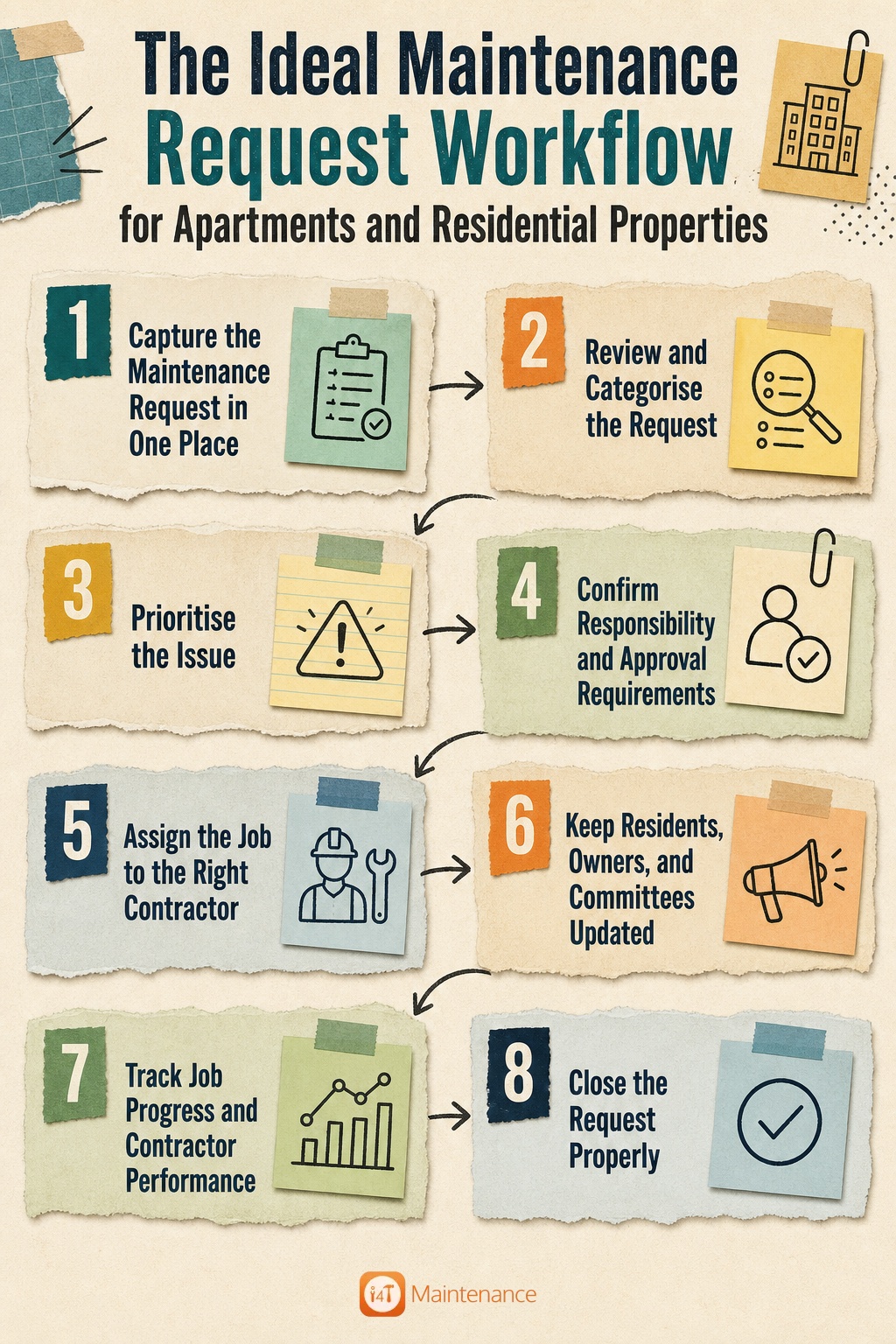
Step 1: Capture the Maintenance Request in One Place
The foundation of an effective maintenance workflow is a single, central place where all maintenance requests come in. Residents, owners, tenants, building managers, or committee members should submit issues via a common portal, digital form, email-to-ticket system, or dedicated property maintenance app.
Capturing detailed information up front is key. This includes the property name and lot or unit number, the requester’s name and contact details, and the exact location of the issue within the property. A clear description of the problem helps assess and prioritise the job quickly.
Attaching photos or short videos provides visual context, avoiding back-and-forth questions. Requesters should state the urgency, any safety concerns, access instructions such as key or gate codes, and their preferred contact method for updates.
Step 2: Review and Categorise the Request
Once a request is captured, the next step is to review and categorise it properly. Good categorisation helps route the request to the right contractor faster and supports reporting on maintenance trends like frequent plumbing or electrical issues.
Typical categories might include plumbing, electrical, lifts and access systems, cleaning, gardening, roofing, security, pest control, general repairs, fire safety, and emergency maintenance. This organised approach enables strata managers to spot patterns and prepare maintenance budgets strategically.
Step 3: Prioritise the Issue
Not all maintenance requests are equal — prioritising ensures urgent and emergency issues are addressed promptly without unnecessary delay.
Emergency issues require immediate attention due to safety or property damage risks, such as gas leaks or fire system faults. High-priority jobs might include lift failures or major plumbing leaks needing quick repair.
Medium priority covers routine repairs that should be scheduled within a few days, and low priority might be minor cosmetic issues or requests that can wait longer without impacting residents.
Assigning a clear priority level — Emergency, High, Medium, or Low — guides decision-making about response times and resource allocation.
Step 4: Confirm Responsibility and Approval Requirements
A critical step for strata managers is determining whether the issue falls under common property responsibility or private lot owner responsibility. This affects who funds and approves the work.
Existing service contracts and warranties should be checked to avoid unnecessary spending, while committee approval may be needed for expenses above set limits or non-emergency work.
Insurance claims or compliance requirements may also impact the approval process. Clearly defining this responsibility early avoids disputes and delays.
Step 5: Assign the Job to the Right Contractor
After approvals, the job must be assigned promptly to an approved contractor with all relevant details: job description, photos, access instructions, priority level, and contact information.
Using property maintenance software makes contractor assignment easier by storing approved supplier lists and previous job histories, ensuring quality and cost control.
Clear communication prevents errors or wasted time and ensures contractors can prepare and schedule the job effectively.
Step 6: Keep Residents, Owners, and Committees Updated
Effective communication is one of the biggest challenges and yet the most important element of a smooth maintenance workflow. Residents and owners want to know the status of their requests without repeated phone calls or emails.
Typical status updates in a workflow include Submitted, Under Review, Awaiting Approval, Assigned, Scheduled, In Progress, Awaiting Quote or Parts, Completed, and Closed.
Keeping everyone informed builds trust and reduces follow-up work for managers.
Step 7: Track Job Progress and Contractor Performance
Tracking jobs closely helps strata managers stay on top of response times, completion dates, and any delays or issues noted by contractors.
Contractor performance monitoring includes logging notes, before-and-after photos, reviewing quotes, checking invoices, and identifying recurring problems for improvement.
These records support better budgeting, contractor selection, and service quality over time.
Step 8: Close the Request Properly
A maintenance request should only be closed once the work is complete to the required standard, and the resident or relevant stakeholder has been informed.
Photos and documents verifying completion, invoices recorded in the system, and notes on any follow-up actions or preventive steps add to a well-rounded maintenance history.
This final step ensures audit readiness and keeps property records organised over the long term.
Manual Workflow vs Software-Based Workflow
Without software, intake usually relies on multiple channels like phone calls, emails, or paper forms, which leads to lost requests and inconsistent records. Tracking each job’s status requires manual updates and follow-ups, often causing delays.
Assigning contractors manually may result in incomplete job details being passed on, while communication with residents is fragmented and reactive. Record keeping is scattered, making reporting and accountability difficult.
Using properties and apartment maintenance software changes this landscape by centralising requests, providing real-time tracking, automating notifications, and storing all documents in one place. Reporting dashboards track costs, contractor performance, and recurring issues, creating transparency and efficiency.
Key Features to Look for in Property Maintenance Software
Choosing the right property maintenance software can make or break your maintenance workflow. The most useful platforms for strata managers include:
- Online maintenance request forms that residents can submit anytime
- Mobile property maintenance app for on-the-go updates and job management
- Contractor management tools to maintain approved supplier lists and manage quotes
- Job status tracking with automatic notifications for all stakeholders
- Photo and document uploads to keep detailed records attached to jobs
- Approval workflows to handle committee or owner authorisations within the system
- Quote and invoice tracking to simplify financial management
- Recurring maintenance scheduling for preventive upkeep
- Reporting dashboards to analyse costs, trends, and contractor performance
- Maintenance history by building kept for compliance and auditing
- Compliance record storage to meet Australian regulatory requirements
Having a property maintenance app integrated into software allows residents to report issues easily, with photos and details via their smartphones, making communication faster and more transparent for all involved.
Common Maintenance Workflow Mistakes to Avoid
When you are juggling multiple properties, mistakes are bound to happen. Here are some of the most common ones:
- Accepting requests through too many different channels, which fragments records and delays responses.
- Starting work before confirming whether the issue is common property or individual lot responsibility, leading to disputes and cost issues.
- Giving contractors incomplete job information or unclear access details causes wasted time and frustration.
- Not keeping residents updated results in repeated follow-up calls, reducing satisfaction.
- Losing records in email threads or spreadsheets compromises accountability and auditing capability.
- Closing jobs too early before confirming completion or resident satisfaction leads to unresolved issues.
- Neglecting to review recurring problems prevents identifying systemic issues.
- Failing to track contractor performance misses opportunities to improve service quality and cost-effectiveness.
Maintenance Request Workflow Checklist for Strata Managers
- Use one central place for all maintenance requests
- Implement a standard request form capturing key details
- Define clear categories for types of maintenance issues
- Set and communicate defined urgency or priority levels
- Verify responsibility before proceeding with work
- Follow a formal approval process for budgets or committee sign-off
- Assign jobs to approved contractors with complete info
- Keep residents and committees updated at key stages
- Track every job through to completion
- Confirm completion with photos, documents, and resident feedback
- Store all invoices and records centrally
- Produce monthly maintenance and contractor performance reports
- Review and schedule preventive maintenance regularly
Frequently Asked Questions
The best way is to use centralised software that allows easy submission, categorises requests clearly, prioritises urgent jobs, assigns contractors efficiently, and provides regular status updates to residents and committees.
The form should ask for the requester’s contact info, property and unit details, a clear description of the issue, photos if possible, urgency level, any safety concerns, and access instructions for contractors.
Strata managers categorise requests as Emergency, High, Medium, or Low priority based on safety, property impact, and urgency to ensure resources address the most critical issues first.
It helps track requests and job progress, improves communication, manages contractors and approvals, keeps detailed records for compliance, and supports reporting and audits.
Maintenance request software focuses mainly on intake and job tracking, while property maintenance software includes broader functions like contractor management, recurring jobs, approvals, invoicing, and comprehensive reporting.
Yes, it allows residents to submit requests with photos and access notes directly from their phones, speeding up reporting and improving accuracy.
They can standardise forms, have clear approval processes, work with approved contractors, send automatic updates, and monitor contractor performance to keep things on track.