

Many strata managers in Australia are all too familiar with the daily chaos of handling maintenance requests. These come in through various channels: phone calls, emails, texts, often without an organised system. Trying to keep track of contractors, updating residents, logging work history and chasing recurring maintenance manually can quickly become overwhelming. Incomplete records, delayed follow-ups, and the risk of missing essential tasks all add up to stressful and inefficient management.
Digital strata maintenance offers a practical operational improvement to this situation. It’s not just a buzzword or a software trend; it’s an effective way of bringing clarity, speed, and accuracy to how maintenance is managed across multiple properties. By moving to a Field Service Management (FSM) software system, strata managers can centralise maintenance activity, automate workflows, and gain better visibility across their entire portfolio. This article will guide you through the step-by-step process of digitising your strata maintenance with FSM software, ensuring you build a smarter, smoother operation suited to your real-world needs.
What digital strata maintenance really means for strata managers
Digital strata maintenance is about transforming the way common property upkeep and repair tasks are handled, from a scattered manual approach to an integrated digital system. For strata managers, this means all maintenance requests, contractor assignments, recurring service schedules and records are managed through one reliable platform.
Instead of juggling spreadsheets, phone calls and emails, digital strata maintenance brings service requests into a single system where they are logged, prioritised, and tracked in real time. Contractors receive job details on their phones, managers monitor progress easily, and residents gain transparency into how issues are being addressed. It also provides a central archive of service history and compliance documents, making audits and reporting far less cumbersome.
For committees and owners corporations, digital strata maintenance offers clear visibility on all maintenance activities without needing to chase the manager for updates. Increased transparency drives trust and ensures properties are maintained proactively rather than reactively.
Why manual maintenance systems create friction across strata portfolios
Manual maintenance processes are surprisingly common but fraught with issues. Managing maintenance through spreadsheets, emails and phone calls may seem simple at first but quickly leads to headaches.
Each request might come in via a different channel, making it hard to get a complete view of outstanding jobs. Paper-based or email trails can be lost or incomplete, and there’s limited accountability once a contractor is assigned.
Spreadsheets are difficult to update live, so teams often work with out-of-date information, causing delays or duplicated work. Recurring maintenance, a key part of strata upkeep, can be missed without reminders or automated scheduling, leading to compliance risks.
Communication breakdowns between strata offices, contractors and residents create friction and frustration. Tracking down past work history for warranty or audit purposes becomes time-consuming, adding to the administrative burden.
In short, these manual systems do not scale well as strata portfolios grow or become more diverse.
How FSM software supports digital strata maintenance
FSM (Field Service Management) software is specifically designed to streamline maintenance workflows for property managers, including those working in strata management. It acts as a central hub for everything involving maintenance work orders, scheduling, tracking and reporting.
With FSM software, jobs can be created digitally as soon as a request comes in, whether from an owner, committee or site staff. Jobs are then assigned to contractors with all necessary details, including location, problem description, priority level and any required approvals.
Recurring maintenance schedules are automated within the system, reducing the chance of missed or overdue tasks. Contractors can update job status live via mobile devices, allowing managers to monitor progress remotely.
Approvals, compliance checklists and service documentation are captured and stored for easy future reference. A comprehensive service history supports better planning, budgeting and audit compliance.
Essentially, FSM software brings visibility and control to the whole maintenance lifecycle from request to completion, centralising communication and records while automating routine actions.
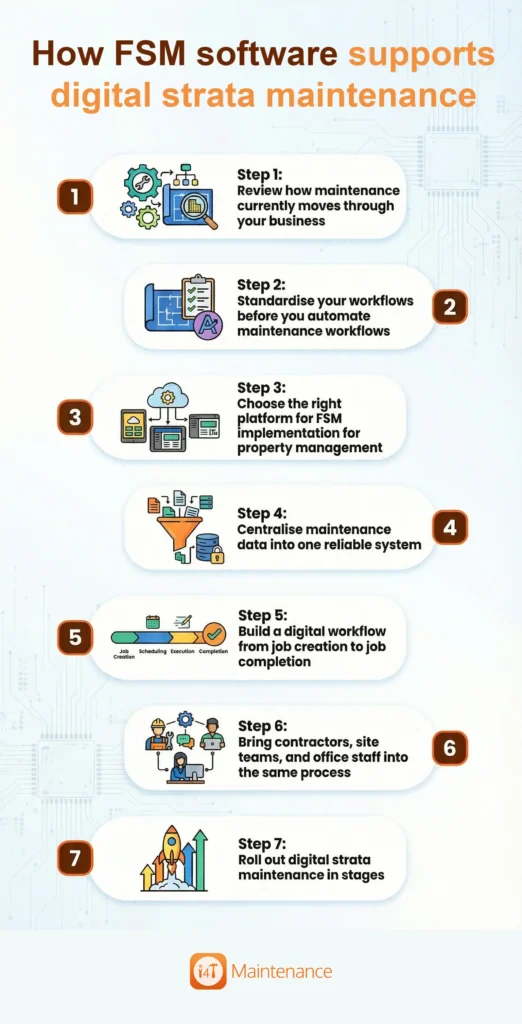
Step 1: Review how maintenance currently moves through your business
The first step to successful digital strata maintenance implementation is understanding your current processes. Map out exactly how maintenance requests come in, how they are approved, assigned, followed up on and closed out.
Identify every request channel, emails, phone calls, resident portals or messages, and note how jobs flow from each. What are the typical approval points or bottlenecks? Who assigns contractors, and how is communication managed?
This exercise will highlight manual steps that slow the process or cause errors and show where information is lost or duplicated. Having a clear picture of your current workflow sets the foundation to build an improved digital process using FSM software.
Step 2: Standardise your workflows before you automate maintenance workflows
To automate maintenance workflows effectively, you need consistent, standard procedures in place. This means categorising jobs, defining priorities, and clarifying approval paths across your strata portfolio.
Decide how you group work, whether by asset type, urgency or location, and establish rules for which jobs require committee or board approval before proceeding. Determine escalation protocols for urgent issues. Also, specify what information is mandatory for each job request, such as photos, risk assessments or special instructions.
Clear expectations about communication and updates at each stage will help prevent confusion between strata offices, contractors and residents.
Standardising your workflows ensures automated systems trigger the correct actions and notifications without manual intervention, enhancing consistency and reliability.
Step 3: Choose the right platform for FSM implementation for property management
Selecting the best FSM software for strata maintenance is crucial. Look for a platform built with strata needs in mind that supports multi-site visibility, management of recurring maintenance schedules, and smooth contractor coordination.
Ease of use is vital to encourage adoption by all team members, from office staff to onsite contractors. Reporting capabilities should allow you to track maintenance trends, compliance and contractor performance easily.
Focus on how the software will fit into your team’s day-to-day operations and whether it integrates with existing property management systems, if applicable.
What strata managers should look for in day-to-day usability
User-friendly software is more likely to be embraced by your team and contractors. Look for intuitive interfaces with straightforward job logging and mobile access for onsite updates.
The ability to easily assign tasks, check statuses, and update job details on the go dramatically reduces administration times. Simple communication tools embedded in the platform help keep all stakeholders informed without switching channels.
Overall, the right FSM software reduces busywork, making maintenance management a smoother experience rather than an extra burden.
Step 4: Centralise maintenance data into one reliable system
Centralising all maintenance-related information removes confusion and duplication. This means storing property asset records, contractor contacts, past service histories, compliance paperwork and supporting documentation within the FSM platform.
Having one reliable source of truth improves decision making, as all site teams and management have access to consistent, up-to-date information.
It also supports regulatory compliance, as documentation and evidence can be retrieved easily during audits or inspections.
Step 5: Build a digital workflow from job creation to job completion
Once your data is centralised and workflows standardised, configure the FSM software to reflect your entire maintenance lifecycle. Requests should be logged quickly, assigned automatically or manually to the right contractor, with all task details included.
Job progress is updated in real-time as contractors perform work, allowing managers and residents to track completion. Approvals and inspections are handled digitally, ensuring no step is missed.
Upon completion, jobs are closed out in the system with confirmation photos or reports captured for records.
Where automation creates the biggest gains
Automation optimises recurring tasks that maintenance teams often find tricky; reminders are sent out automatically for standard inspections and services, eliminating the risk of forgetfulness.
Escalations flag overdue tasks to managers for quick intervention. Status updates keep everyone informed without manual follow-ups.
Reporting tools aggregate data effortlessly, providing insights about common issues, contractor performance, and maintenance costs.
Step 6: Bring contractors, site teams, and office staff into the same process
Successful digital strata maintenance requires collaboration. FSM software connects your entire maintenance ecosystem, encouraging shared workflows where contractors, site teams, and office staff operate within the same system.
This ensures all parties have access to relevant information, submit updates promptly and maintain accountability.
Clear communication channels reduce misunderstandings and speed up issue resolution on site.
Step 7: Roll out digital strata maintenance in stages
Changing how your team manages maintenance is a big step, so a phased rollout works best. Start with a pilot site or small portfolio subset to identify any challenges early and gain early wins.
Use initial feedback to refine workflows and provide targeted training for users.
Gradually scale the implementation across all sites once confidence and use grows.
This incremental approach reduces disruption and ensures your team adapts to the new digital way effectively.
Common mistakes to avoid when digitising strata maintenance
Avoid digitising inefficient manual processes. Take time to standardise workflows before automating.
Don’t choose software based purely on features; it must fit your strata team’s needs and skill levels.
Lack of contractor buy-in can stall success. Engage contractors early and highlight benefits to ensure adoption.
Insufficient onboarding and training lower user confidence and increase resistance.
Failing to measure and review results after going digital means missed chances to improve.
What results strata managers can expect after implementation
After successfully digitising strata maintenance, managers typically see clearer visibility over jobs across all sites, reducing missed or delayed tasks.
Response times to maintenance requests improve as workflows become streamlined.
Maintenance records become accurate and complete, simplifying compliance and reporting.
Administrative tasks reduce, freeing up time for strategic management.
Contractor oversight is enhanced, improving service quality and accountability.
Overall, the process becomes more predictable and scalable as portfolios grow.
Signs your business is ready for digital strata maintenance
If your team struggles with tracking jobs across multiple channels and sites, or if recurring maintenance frequently slips through the cracks, it’s a strong sign you need digital strata maintenance.
High administrative workloads and frustration about lost information also indicate manual methods are no longer sustainable.
When you seek better transparency for committee reporting or want to improve contractor communication and accountability, FSM software becomes the answer.
In short, if current maintenance management feels chaotic and reactive, it’s time to consider moving to a digital solution.
Final thoughts
Digital strata maintenance with FSM software is more than just adopting new technology. It’s about building a maintenance operation that’s dependable, transparent, and able to grow with your portfolio.
By following the practical, step-by-step process outlined here, Australian strata managers can overcome the frustrations of manual systems and unlock a smarter, smoother way to keep properties in great shape.
The result is a better experience for strata managers, contractors, residents and committees alike, all working from a single source of truth, with workflows that automate the routine and empower teams to focus on exceptional service.
Frequently Asked Questions
Digital strata maintenance is managing all property upkeep tasks through an integrated software system, replacing manual tracking with automated workflows and centralised records.
FSM software streamlines maintenance by organising requests, scheduling contractors, tracking work progress, automating recurring jobs, and storing service histories, improving visibility and control.
It involves reviewing current workflows, standardising processes, selecting suitable software, centralising data, automating job flows, involving contractors, and rolling out the system in stages.
By standardising job categories, approval paths and communication before automation, teams can use FSM software to simplify repetitive tasks and notifications without complicating processes.
Look for usability, mobile access, multi-site management, recurring maintenance features, contractor coordination, and strong reporting capabilities suited to strata portfolios.