

Property managers and strata managers often juggle maintenance information spread over emails, spreadsheets, phone calls, contractor messages, invoices, approvals and photos. This scattered approach can make it tough to keep a clear view of property upkeep and costs.
Using property maintenance software helps tidy all this up. It allows managers to build a complete, searchable, and reliable digital maintenance history across every property, scheme and common area they look after. This article explains how to go from scattered files to a thorough digital record that captures everything, from request to completion.
Keeping a full maintenance history means nothing goes missing, decisions become clearer and reporting to committees or owners is much faster. Whether you manage a few strata schemes or many buildings, a solid system using property maintenance software is a game changer.
Why a Complete Digital Maintenance History Matters
Digital maintenance history is the operational memory of any building or strata scheme. For property managers, it means having all maintenance and repair information at their fingertips.
This history boosts visibility across multiple properties, letting managers update committees quickly and with confidence. Having clear records also tightens contractor accountability, showing exactly when work was done and what was charged.
Good digital records support smoother insurance claims and compliance checks because evidence such as photos, invoices and approvals are stored in one place. When teams change or managers hand over duties, a rich maintenance history keeps workflows seamless.
Finally, it improves budget planning by revealing patterns of recurring repairs or ageing assets needing replacement—saving future headaches and unexpected costs.
What Is a Digital Maintenance History?
A digital maintenance history is more than just a folder packed with files. It’s an interconnected online record linking maintenance requests, work orders, approvals, contractor updates, quotes, invoices, photos, warranty details and completion notes.
This system allows property managers to trace every issue from the moment it’s reported through to resolution, with all related documents and communications tied together.
At its heart, it is a single source of truth where anyone authorised can quickly find detailed, up-to-date information about the maintenance status of any property, common area or specific asset.
Why Emails and Spreadsheets Are Not Enough
Using email inboxes, spreadsheets, shared drives, and phone messages for maintenance tracking scatters information across different places. This disjointed approach makes it easy to lose context or miss updates.
Photos, contractor messages and invoices often end up in separate folders or attachments, breaking the connection with the original maintenance request.
When managers change roles or teams, important knowledge about ongoing jobs can disappear, slowing committee reporting and showing no clear work order history.
Spreadsheets have limits on searchability and audit trails, so repeated issues can go unnoticed and contractor performance is harder to measure.
How Property Maintenance Software Creates One Source of Truth
Property maintenance software brings together every step of maintenance management into a single platform. When a request is lodged, it’s recorded alongside photos and reporter details and assigned a unique work order.
Contractors can be assigned directly and update their progress. Managers can attach invoices, quotes and approvals in one place. All updates are logged, making it easy to track job status and costs.
With searchable digital maintenance records, managers can quickly review the complete work order history to spot repeat repairs, compare contractor quality, and generate reports for committees.
This centralised approach uses property maintenance management software to boost efficiency and reduce manual admin, making reliable maintenance reporting easier.
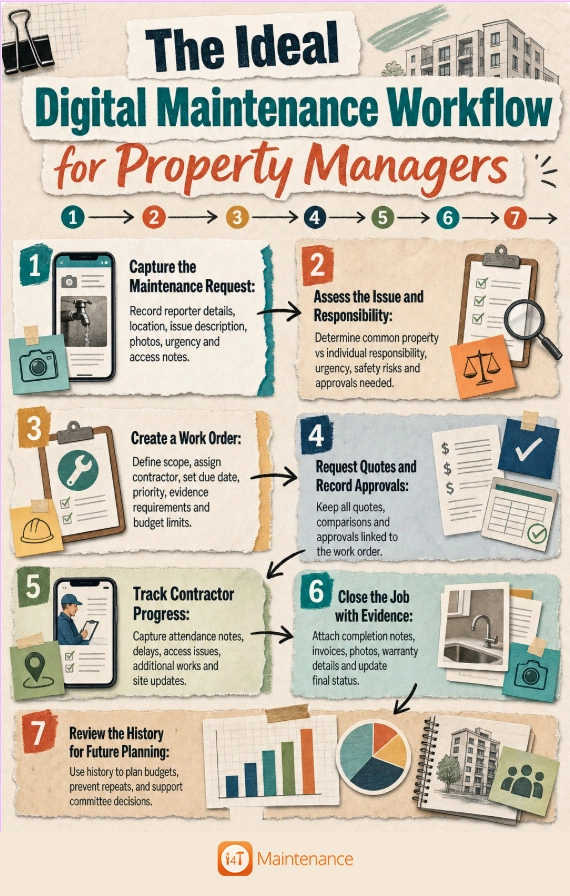
The Ideal Digital Maintenance Workflow for Property Managers
How Work Order History Helps Strata Managers Make Better Decisions
Work order history reveals patterns that support smarter maintenance management. For example, repeating repairs to a garage door within months might indicate the need for full replacement rather than patch fixes.
Tracking the speed and quality of different contractors via their past jobs helps managers make better supplier choices.
Identifying buildings or common areas with frequent issues lets managers prioritise inspections or upgrades, preventing bigger failures down the track.
In this way, a thorough work order history is a vital decision-making tool for property managers and committees.
How Digital Records Help with Committees, Owners and Contractors
A complete digital maintenance history streamlines communication with all stakeholders. Committee members get timely, clear reports with all costs and approvals documented.
Owners appreciate transparency through updates and evidence of completed work, reducing queries and disputes.
Contractors can receive precise instructions and feedback based on prior history, improving service quality.
Good property maintenance management software captures information continuously during the maintenance process, making reporting faster and more accurate.
How Digital Maintenance Records Support Compliance, Insurance and Disputes
Digital records provide a factual timeline showing what happened, when and who was involved. This includes photos pre- and post-repair, invoices, detailed scope of works, documented quotes and approvals, and warranty details.
Such evidence simplifies insurance claims and if disputes arise, assists in clarifying responsibilities.
Note that record-keeping rules vary between Australian states and territories, so managers should always check local strata or owners corporation guidelines for compliance.
For detailed guidance, see [External link: Australian strata compliance resources].
What to Look for in Property Maintenance Management Software
These capabilities help reduce manual admin and build a more reliable, transparent digital maintenance history.
- Work order tracking with status updates and priority settings
- Searchable maintenance records to find past jobs quickly
- Contractor management tools including contact details and performance notes
- Photo and document storage attached to relevant jobs
- Approval workflows to capture authorisations systematically
- Committee reporting features to generate clear summaries
- Preventive maintenance scheduling for planned upkeep
- Asset history tracking for long-term planning
- Mobile access so staff can update jobs on site
- User permissions to control who can see and edit records
- Notifications and reminders to keep jobs on track
- Invoice and cost tracking linked to each work order
- Audit trail for compliance and accountability
- Exportable reports for meetings and budgeting
How to Move from Paper, Email and Spreadsheets to a Digital Maintenance History
Transitioning to a digital system may feel overwhelming, but a step-by-step plan makes it manageable. Start by migrating open jobs and recent or high-value repairs into the new software.
Prioritise recurring issues and insurance-related records that require clear evidence. Standardise naming conventions and attach all essential documents like photos and invoices.
Train your team and contractors on the new process to ensure consistent use. Review the system after 30 days and adjust any workflows for better efficiency.
A gradual, organised approach helps integrate digital maintenance management into day-to-day routines.
Common Mistakes That Lead to Incomplete Maintenance Records
Some common mistakes cause gaps in maintenance history. Closing jobs without completion notes or photos leaves unclear outcomes. Not linking invoices and approvals directly to work orders breaks audit trails.
Saving photos and updates in separate folders or apps loses context. Using vague job titles or failing to record warranty details causes confusion with future claims.
Losing contractor updates in SMS or emails and not connecting repeat problems means missed signals for major repairs.
Avoiding these errors by following a solid workflow keeps records accurate and trustworthy.
Final Checklist for a Complete Digital Maintenance History
Every maintenance record should ideally include the following:
- Date reported
- Reporter details
- Property or scheme
- Location
- Issue description
- Photos or videos
- Urgency
- Work order number
- Contractor
- Quotes
- Approval record
- Updates
- Completion date
- Invoice
- Final cost
- Completion evidence
- Warranty details
- Related previous jobs
- Status
Why i4T Maintenance Management Software Helps
i4T Maintenance Management Software is designed specifically for strata and property managers who want to keep requests, work orders, contractor updates, approvals, invoices, photos and maintenance history all in one place.
With i4T Maintenance, teams reduce manual admin tasks, improve visibility of ongoing jobs, manage contractors more effectively, and track work orders with confidence.
This software supports building a reliable digital maintenance history that saves time and supports smarter decision-making.
If you’re ready to simplify maintenance tracking and improve record keeping, exploring i4T Maintenance Management Software is a practical next step.
Conclusion
Maintaining a complete digital maintenance history is crucial for property managers handling multiple schemes and common areas. It ensures transparency, speeds up committee reporting, improves contractor management and supports budget planning.
Property maintenance software turns scattered emails, spreadsheets and paper trails into one searchable, trustworthy record accessible anytime.
With clear workflows and an organised digital system, managers can deliver better service, control costs, and reduce disputes.
Explore i4T Maintenance Management Software to bring this level of simplicity and oversight to your maintenance tracking and work order management today.
Frequently Asked Questions
A digital maintenance history is a complete, interconnected online record showing all maintenance requests, work orders, approvals, contractor updates, photos, invoices and completion notes for a property.
Maintenance records provide an operational memory, improve communication with committees and owners, support insurance claims, and help plan budgets by showing the full history of repairs and upkeep.
Property maintenance software centralises all maintenance activity, tracks work orders from start to finish, stores photos and documents, manages contractors, and keeps records searchable and up to date.
Work order history should include request details, dates, reporter info, contractor assignments, quotes, approvals, progress notes, invoices, completion evidence and warranty information.
Yes. Unlike spreadsheets, property maintenance management software links all related information in one place, offers audit trails, supports approvals, and makes searching past jobs quick and reliable.
By using a digital system that captures complete details for each job, attaches photos and invoices, tracks approvals and contractor updates, and keeps everything searchable and linked.
Start by transferring open and recent jobs into your software, prioritise recurring or high-value repairs, standardise naming and attachments, train your team and review the process after the initial 30 days.