

TL;DR
Work orders usually get stuck because approval authority is unclear, spending limits or quote requirements apply, or the work order lacks key details. These gaps create follow-up questions and cause strata work order approval delays.
How do you unblock approvals fast?
- Use an “approval-ready” work order pack that includes scope, photos, risk if delayed, responsibility, quote summary, and recommendation.
- Triage by urgency
- Batch similar jobs
- Pre-approve recurring maintenance categories.
This streamlines maintenance approvals by the owners corporation and reduces work order backlog in strata management.
i4T Maintenance helps standardise this process and keep recurring maintenance work orders moving.
If you’ve ever had a contractor ready to go, a resident chasing an update, and a work order sitting in “Pending approval” for weeks… you’re not alone. Strata work order approval delays are one of those quietly expensive problems: they chew up your time, frustrate committees, and let small issues, like a tiny leak, turn into big invoices.
The good news? Most stuck work orders get stuck for the same handful of reasons, and once you spot the pattern, you can build a process that keeps approvals moving without bulldozing governance or stepping outside the rules.
Below are 10 practical fixes you can use to streamline maintenance approvals by owners corporation, or body corporate and reduce work order backlogs in strata management, starting this week.
1. Why do strata work orders get stuck in the first place?
Most delays aren’t because people don’t care. They happen because the decision pathway is fuzzy, the information pack is incomplete, or the job doesn’t fit neatly inside agreed budgets and spending limits.
In practice, approvals stall when a committee member thinks, “Hang on… who’s responsible for this?” or “Why is this quote so high?”, and nobody has the answer in the work order.
The other sneaky factor is timing. If your scheme only makes decisions at set meeting cycles, a work order that misses the cut-off can sit around until the next meeting, even if it’s straightforward.
NSW Fair Trading guidance on the repairs process highlights that common property repairs typically involve obtaining quotes and having the quote approved.
2. Who actually has the authority to approve the work, and when?
Approvals move quickly when everyone knows who can say “yes”. Approvals crawl when the authority is unclear or changes depending on the job.
Across Australia, the details vary by state legislation and scheme governance, but the theme is consistent: some decisions can be made by the committee, while others must go to the broader ownership group at a general meeting, especially when the value is higher or the decision is more significant.
If you’re seeing repeated delays, it’s usually because the scheme doesn’t have a simple “approval map” that covers:
- who can approve routine maintenance
- what must be escalated and why
- what evidence is required at each level, such as quotes, photos, scope, etc.
And yes, sometimes the work order is stuck because people are waiting on quotes or quote comparisons. NSW guidance also notes requirements around obtaining and approving quotes for common property works, and references situations where multiple quotes are required above certain values.
Here’s what you need to do: Put the likely approval pathway in the work order itself, e.g., “Committee approval within spending limit” vs “Requires general meeting motion”).
3. How do spending limits and quote requirements slow approvals down?
This is one of the biggest causes of “mystery delays”: the job is ready… but the approval rules quietly change once the price crosses a threshold.
In Queensland, for example, the government explains how committees can have spending limits and how those limits are calculated if not set, and that quote requirements can be triggered depending on thresholds. Even if you’re not in QLD, the concept carries nationally: when a job is “over the limit,” you often need more process, more quotes, a formal motion, or a meeting decision.
That’s when delays stack up:
- You get one quote, then someone asks for two.
- The second quote takes a week.
- Then someone wants clarification.
- Then it misses the agenda deadline.
Fast fix: Build a “threshold-aware” intake step. Before you chase quotes, check whether the job is likely to sit under committee authority or needs escalation. If it’s close to the line, plan for the extra step upfront instead of discovering it later.
4. What info needs to be in a work order so it gets approved the first time?
Think of a work order like a mini business case. If the committee or owners corporation can 4understand the what, why, cost, and consequences in 60 seconds, approvals happen fast. If they have to ask three follow-up questions, you’ve just added a week.
Here’s the “approval-ready” pack that reduces back-and-forth:
- Clear scope: what’s being done, where, and what “done” looks like
- Photos/video: one wide shot and one close-up, more if needed
- Urgency & risk: what happens if it’s delayed – safety, compliance, damage spread
- Responsibility note: common property vs lot and why you think so
- Quote summary: price, inclusions/exclusions, timeframe, access requirements
- Contractor checks: licence/qualification and insurance where relevant
- Recommendation: which option do you propose, and a plain-English reason
That last point matters more than people admit. A work order that says “Quote attached” invites debate. A work order that says “Recommend Quote A because it includes after-hours isolation and a 5-year warranty” invites a decision.
5. What’s the fastest way to classify urgency so the right jobs move first?
When everything is “urgent,” nothing is. The fastest way to unclog approvals is to agree on a simple urgency system so the committee isn’t re-litigating priority every time.
A practical triage that works in most schemes:
- When there is a safety, compliance or active damage issue, fast-track with the same-day or 48-hour decision window.
- When there is a service disruption, make it a priority and set a decision deadline.
- When it’s a routine, preventative or cosmetic upgrade, add it to a standard queue, and batch approvals where possible.
This is where longer-term planning earns its keep. Consumer Affairs Victoria stresses that owners corporations have obligations to repair and maintain common property, and it recommends maintenance planning to manage responsibilities properly. When your scheme has a maintenance plan or forward program, many approvals stop being “surprises” and start being “scheduled decisions.”
6. What committee concerns usually slow down a decision, and how do you pre-empt them?
Committees rarely say “no” directly. More often, they slow things down with questions, and those questions are usually predictable.
If you pre-empt them inside the work order, approvals speed up dramatically.
Common slowdown concerns and how to handle them include:
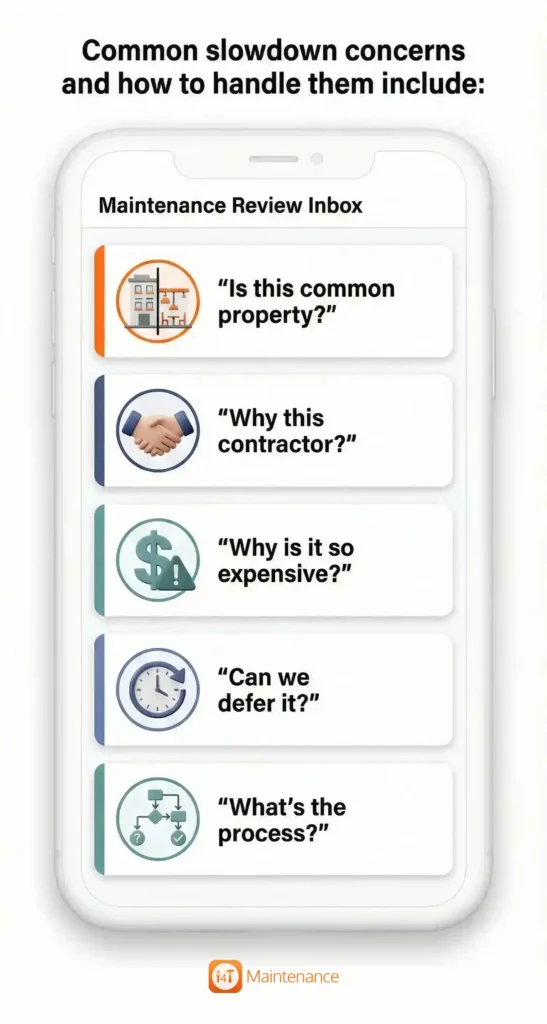
- “Is this common property?”
Add a one-liner rationale and note any relevant plan/history. If it’s grey, say so and propose a quick determination step. - “Why this contractor?”
Provide a short comparison: availability, scope match, warranty, and price drivers. If you use a panel, say that upfront. - “Why is it so expensive?”
Explain constraints: access (rope, EWP, shutdowns), compliance, out-of-hours, specialised parts, and make-good works. - “Can we defer it?”
Include a consequence-of-delay note: cost escalation, risk, resident impact, and potential damage to other lots. - “What’s the process?”
State the approval pathway plainly: committee vote, circular resolution, or general meeting motion.
One small but powerful trick: include a “decision ask” line at the end. Example: “Approval requested: proceed with Quote B ($X) by Friday 5 pm to secure booking next week.”
7. How do you streamline maintenance approvals by owners corporation without cutting corners?
You’re not trying to make strata governance “less governance-y.” You’re trying to make it less repetitive.
If you want to streamline maintenance approvals by owners corporation, focus on designing decisions that happen once, then repeat cleanly.
High-impact strategies:
- Create an approval matrix
Document who approves what at each price band, and what evidence is required, like quotes, comparisons, and scope detail. This alone can remove half your delays because it stops arguments about process mid-stream. - Pre-approve recurring maintenance categories
A lot of work orders are predictable: scheduled inspections, gutter cleaning, fire services coordination, pump servicing, lift maintenance. Pre-approving categories (and contractors/panels) turns “approval every time” into “approval once, then execute.” - Use planned maintenance to reduce surprise approvals
Consumer Affairs Victoria notes that maintenance plans help owners corporations manage required repairs and maintenance over time. When the committee expects the item, they’re far less likely to stall it. - Standardise the approval pack
Make every work order look familiar: same headings, same photo format, same comparison layout. Familiarity reduces debate.
8. How do you reduce work order backlog in strata management when you’re already behind?
Backlog is stressful because it feels endless. The trick is to stop treating it like one giant list and start treating it like a triage-and-batch exercise.
Here’s a “backlog rescue plan” that works even when you’re flat out:
- Step 1: Sort by risk first. Highlight any issues concerning safety, active leaks, compliance, or major service failures.
- Step 2: Group by trade. Mention whether the issue needs plumbing, electrical, access, or roofing, so you can bundle approvals.
- Step 3: Identify quick wins. Push issues that have a small scope, require a single quote, or are clearly within limits, and push these through fast
- Step 4: Cancel or park stale items with a note. Mark issues as duplicate, resolved, owner responsibility, awaiting info, etc so you know exactly where they stand.
- Step 5: Run an approval sprint. Hold a short committee session focused only on decisions, not discussion.
The key is momentum. Once the committee sees the backlog shrinking, they’re more willing to keep approving rather than postponing.
9. What templates or wording speed up approvals immediately?
You don’t need fancy documents. You need consistent wording that helps people decide.
Try these lightweight formats:
- One-paragraph scope:
“Issue observed at [location]. Proposed works: [3–5 dot points in a sentence]. Access required: [details]. Expected timeframe: [X].” - Price + inclusions snapshot:
“Quote total: $X (includes [key inclusions], excludes [key exclusions], warranty [Y], timeframe [Z]).” - Decision ask (with deadline):
“Approval requested: proceed with Quote A for $X. Please confirm by [date/time] to secure contractor availability.” - Option framing (when needed):
“Option 1: patch repair ($X) – quicker, shorter lifespan. Option 2: full replacement ($Y) – longer-term fix.”
This isn’t about being pushy. It’s about reducing the mental load required to approve a job.
10. How do you keep approvals moving long-term, so this doesn’t come back next quarter?
Once you’ve cleared the immediate blockages, the goal is to make approvals boring, in the best way.
Three long-term habits make the biggest difference:
Track a few simple metrics
You don’t need a dashboard masterpiece. Start with:
- average time from “raised” to “approved”
- percentage of work orders approved first pass without rework
- number of work orders older than 30 days
Build a rhythm with the committee
A short monthly maintenance snapshot, even a single page, keeps everyone aligned. It also reduces the “I didn’t know about this” reaction that slows approvals.
Move repeatable work into recurring workflows
When recurring inspections and planned maintenance are treated as standard operations, approvals stop being emotional debates and start being routine governance.
And that’s where software can genuinely help, because chasing approvals manually (emails, spreadsheets, scattered threads) is how work orders get stuck in the first place.
Is your process asking for too many follow-ups
If your work orders keep stalling, it’s usually not a motivation problem. It’s a clarity problem: unclear authority, unclear thresholds, unclear scope, and unclear consequences.
When you standardise an approval-ready work order, apply a simple urgency model, and batch the routine stuff, you’ll see fewer strata work order approval delays, faster decisions, and a calmer inbox. You’ll also reduce work order backlog in strata management, because the pipeline stays moving instead of clogging at the same point every month.
If you want to make this easier, especially for recurring work, i4T Maintenance – Maintenance Management Software helps strata managers standardise work orders, track approvals, and run recurring maintenance work orders without chaos, so jobs don’t sit in limbo and contractors don’t fall through the cracks.
FAQs
Usually, it’s missing information (scope, photos, quote details) or unclear authority; people aren’t sure who can approve, or whether the job is within spending limits.
Use an approval-ready work order template, confirm the approval pathway upfront (committee vs owners corporation), and batch recurring maintenance approvals wherever possible.
Clear scope, photos, urgency/risk if delayed, responsibility, quote inclusions/exclusions, timeframe, and a simple recommendation.
Triage by risk first, group work orders by trade, push through quick wins, and run a short “approval sprint” session to decide multiple items at once.
Recurring work is predictable, so it can be pre-approved and scheduled, reducing surprise decisions, cutting admin, and preventing small issues from becoming urgent later.